A First-Time Viewer’s Scoreboard Checklist
Use this tennis scoreboard checklist to identify the server, separate point and game totals, and make sense of tie-breaks without losing track of play.
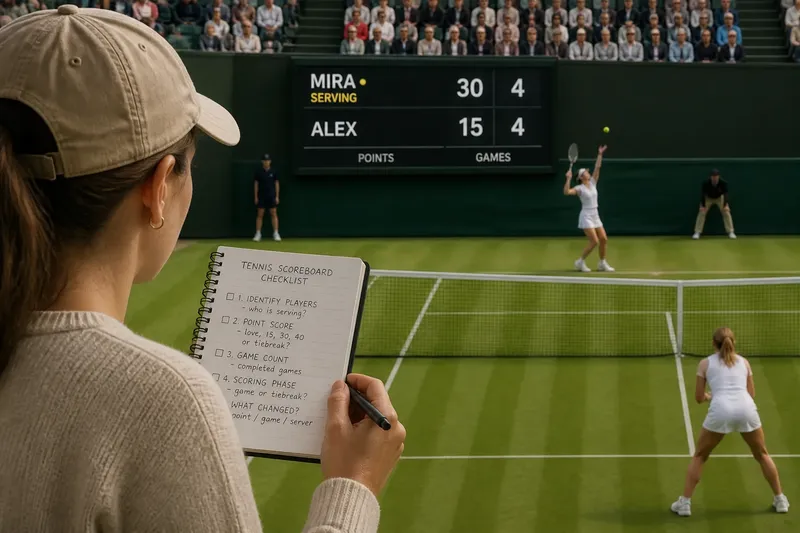
The common mistake with a tennis scoreboard is treating every number as part of the same score. That makes it easy to miss who is serving or whether a game has actually ended. Use this tennis scoreboard checklist to sort the display by player, scoring phase, and the change you are watching for.
Match names to players
Start with the player names or initials. Broadcast graphics may list them in an order that does not match the near and far sides of the court, so do not use screen position alone to identify a player.
Look for a dot, serve icon, or highlighted name to locate the current server. If the graphic is unclear, watch who prepares to serve before play resumes. Keep the server attached to that player’s name, not to a side of the screen that might change with the camera angle.
- Names visible: If both names are clear, match each score to its player; if not, wait for the graphic to sharpen or use the players’ positions on court.
- Server marker visible: If an icon identifies the server, confirm it against the live court; if it conflicts, trust the player preparing to serve and recheck the graphic later.
- Camera angle changes: If the players switch screen sides, keep following their names; if names are hidden, wait for a clear view before assigning a score.
Separate points and games
The changing point score belongs to the game in progress. In an ordinary game, the familiar sequence is love, fifteen, thirty, and forty. A player at forty may win the game with the next point, unless the score is tied at deuce.
Do not confuse those point values with the set’s game count. The game count records completed games and stays put while the next game is being played. A broadcast may give the changing point score more visual prominence, but its position on the screen does not change what it means.
- Point score changes after a rally: If only the point display changes, keep following the same game; if the game count also changes, check whether a new game has begun.
- Game count stays steady: If the players are still contesting a game, leave the set total alone; if a player has won the game, look for that player’s game count to rise.
Watch for a new game
When a game ends, its point score clears for the next game, and the player who serves changes. The completed game is reflected in the set’s game count. These changes together are a useful signal that the display has moved to a new game.
A set continues until a player meets that competition’s required game total and lead. The format can vary, so use the match graphic or event information rather than assuming every set follows the same ending rule.
Read a tie-break
A tie-break is a different scoring phase, not an ordinary game with an unusual point display. Its points are shown as a running total rather than the love-fifteen sequence. Follow the tie-break score shown on screen and keep it separate from the set’s completed game count.
If the graphic is crowded, focus on the players’ names and the tie-break point total. Once the tie-break ends, check the set display again to see how the set was recorded. Avoid interpreting a tie-break point as though it were a game in an ordinary sequence.
Recover your place?
Why did the point score reset?
The previous game ended, and the display is starting the next one. Check whether a player’s game count has changed and identify who will serve.
What does a small dot mean?
Many broadcasts use a dot or serve icon to mark the server. Graphics differ, so confirm the marker by watching who is preparing to serve.
Why is the game count unchanged?
The current game may still be underway, even if its point score has changed. Wait for the game to end before expecting the set’s game count to move.
How can I tell if play is in a tie-break?
Look for a running point total instead of the ordinary love, fifteen, thirty, and forty sequence. If the display is unclear, use the broadcast’s tie-break label or wait for the next score update.
Try the sequence live
Imagine you turn on a fictional broadcast during a game. The invented graphic shows Mira serving, an ordinary point score of thirty-fifteen, and a set game count of four-all. You see the next rally end, and the point score changes to forty-fifteen while the game count remains four-all. Mira wins the following point; the point display clears, the set count becomes five-four, and another player is marked to serve. You can now identify the completed game and the new server without treating the cleared point score as a change to the match result.
Use the quick checklist
Check each item in order. If the observation does not fit, use the alternative action rather than guessing at the score.
- Player names: If both names are readable, attach each score to the correct player; if not, wait for a clearer graphic or court view before assigning scores.
- Server marker: If the marker matches the player preparing to serve, keep that player in mind for the game; if it does not, use the live court and recheck the marker after play.
- Point display: If the changing figure follows the love-to-forty sequence, treat it as the ordinary game score; if it shows a running total, check for a tie-break label before interpreting it.
- Game count: If the count is unchanged after a rally, continue following the current game; if it rises, treat the previous game as complete and find the next server.
- Scoring phase: If the display uses ordinary point terms, follow the game score; if it uses a running point total, follow the tie-break display and keep it separate from games won.
- Graphic conflict: If the score, server icon, and live court appear inconsistent, wait for the next pause or refresh the broadcast graphic; do not infer a new score from a replay.
For a quick tennis scoreboard check, identify the player, read the scoring phase, then notice which part of the display changes after the next rally. That order helps distinguish a point update from a completed game and keeps the set score in its proper place.